Usage
How it works
BetterMediaBrowser extends the MODX browser with drag & drop functionality for moving one or more files within the tree, deleting/downloading multiple files, and searching for files in the currently active media source. It also remembers the most recently used subfolders of a media source and restores them the next time the source is opened. The file search uses a cached file index per media source, which is cleared automatically when files are changed in the media browser. Files that are changed outside of MODX or unpacked from a zip file in the media browser are found after up to five minutes, when the file index expires. The menu entry Clear media browser cache below the Clear Cache menu entry clears the cache of all media sources immediately.
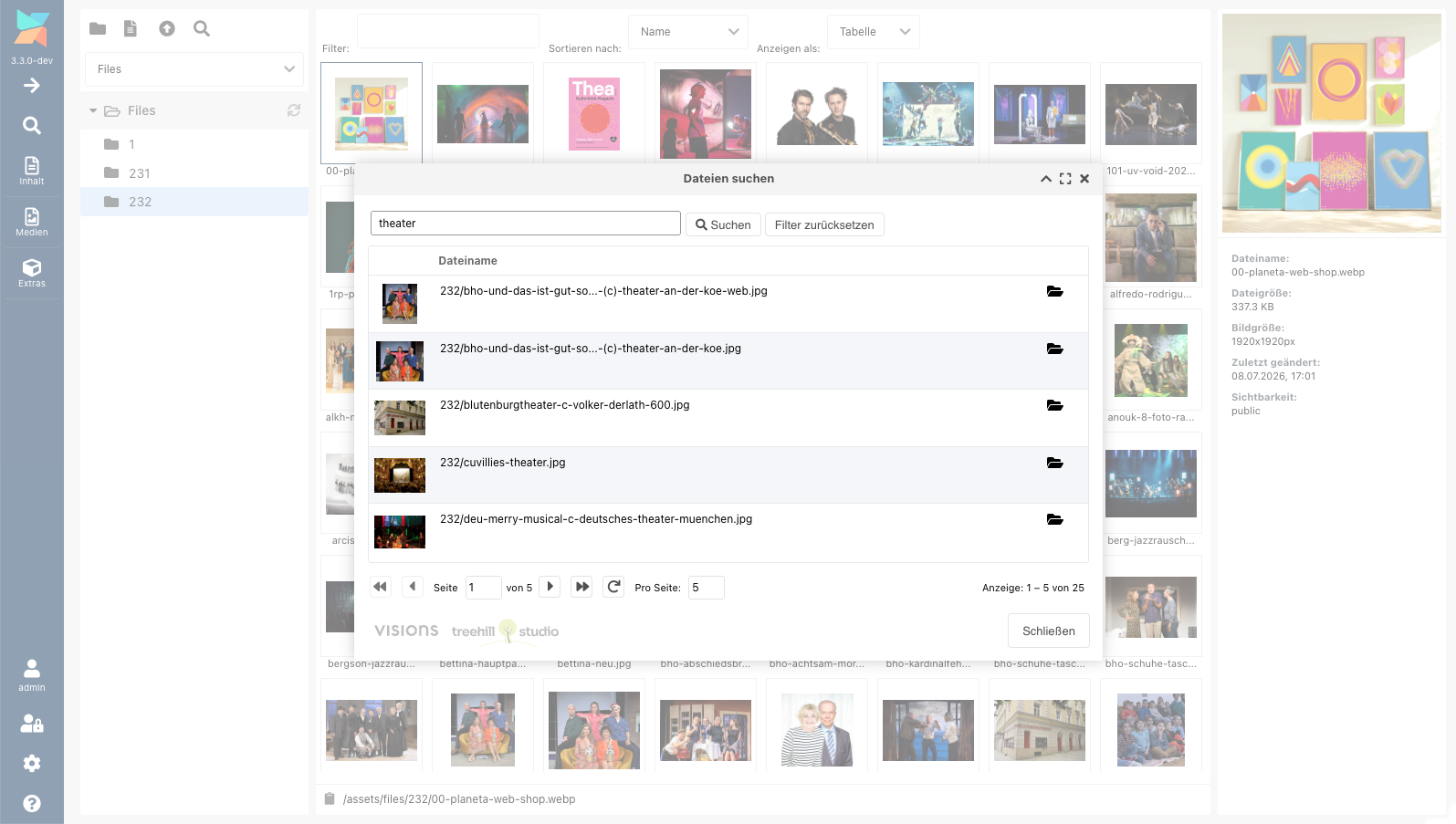
The first search in the file search window is started with the Enter key or the search button. It scans the media source and builds its file index, which can take a few seconds in large media sources. After that, the search window searches while typing. Media sources with more than 50,000 files have no file index, they are searched only with the Enter key or the search button.
BetterMediaSource
BetterMediaBrowser installs the media source type BetterMediaSource. It works like the file system media source with the same properties, permissions and policies, and adds three things:
- Faster folder lists (MODX 3): The media browser tree and file view are
built up to 30 times faster. The core media source reads each image
completely up to three times, detects the MIME type of each file up to three
times and prepares all media source properties for each file. The lists are
the same, only a text file with the extension of a binary image (i.e. a text
file named
image.jpg) is not offered for editing. - Cached folder lists: The media browser tree and file view are cached, so
folders with many files (i.e. a few hundred images) open much faster. The
cache is per user, context and manager language. Files added, removed or
renamed outside of MODX are shown immediately, files whose content is
replaced outside of MODX are shown with the old size and image dimensions
until the cache lifetime ends. The lifetime is set with the
bettermediabrowser.list_cache_lifetimesystem setting. Folder lists larger than 1 MB (about 600 images in the tree and 800 images in the file view) are not cached. - Cache clearing in the media source: The cache of the media source is cleared after each file change in the media source itself, even if the BetterMediaBrowser plugin is disabled or a file is changed by other code that does not fire the file manager events. If a file is moved to another media source, the cache of both media sources is cleared.
The file search, drag & drop, the multiple selection and the restored subfolders work with all media sources. A BetterMediaSource is only useful, if browsing the folders of a file system media source is slow.
To use it, change the type of an existing file system media source to BetterMediaSource or create a new media source of this type. When BetterMediaBrowser is uninstalled, all BetterMediaSource media sources are converted back to file system media sources.
System Settings
BetterMediaBrowser contains some system settings in the bettermediabrowser
namespace.
| Key | Name | Description | Default |
|---|---|---|---|
| bettermediabrowser.debug | Debug | Log debug information in the MODX error log. | No |
| bettermediabrowser.enabled | Enabled | Enable the BetterMediaBrowser extension. | Yes |
| bettermediabrowser.drag_drop_enabled | Enable Drag & Drop | Enable drag-and-drop for files in the MODX Browser. | Yes |
| bettermediabrowser.search_enabled | Enable Search | Enable the BetterMediaBrowser file search. | Yes |
| bettermediabrowser.search_min_length | Min Length | Minimum length of the search string before a search is executed. | 2 |
| bettermediabrowser.search_max_results | Max Results | Maximum count of files in the search results. | 500 |
| bettermediabrowser.excluded_folders | Excluded Folders | Comma-separated list of folders to be excluded from the search results.1 | .*/,_*/,core/,components/,connectors/,manager/ |
| bettermediabrowser.list_cache_lifetime | List Cache Lifetime | Seconds, that the BetterMediaSource media source caches the folder lists of the media browser. 0 disables the cache. | 300 |
-
The folders in the list may use
*and?inside a single path segment,**spans multiple segments, so a pattern starting with**and a slash matches at any depth. A pattern without a trailing slash is treated as a folder. ↩